Let customers change their shipping address before you ship
A wrong address turns into a support ticket, a reship, or both. The customer usually notices after they pay. Until the order is fulfilled, they can correct the shipping address on the thank-you page or the order status page, before fulfillment, inside the edit window you set.
ShipEdit saves the new address on the Shopify order. Unlimited orders, and no upsells. Install on the Shopify App Store.
Why Shopify customers can't edit their address after checkout
After checkout, Shopify keeps the shipping address that was entered. The customer does not get a control in checkout to rewrite it. The usual path is an email to the store, then a manual edit, or a package sent to the wrong place. That is the checkout Shopify provides.
ShipEdit does not replace checkout. It adds a block after the order exists, and it writes the address the customer submits onto the Shopify order.
Edit the address from the thank-you page
The thank-you page is the first screen after payment. With the ShipEdit block added, the customer can choose Change address and submit a new shipping address. If you allow cancellations, Cancel order is on that same block. A successful address change is tagged on the order, and ShipEdit does not offer a second address edit.
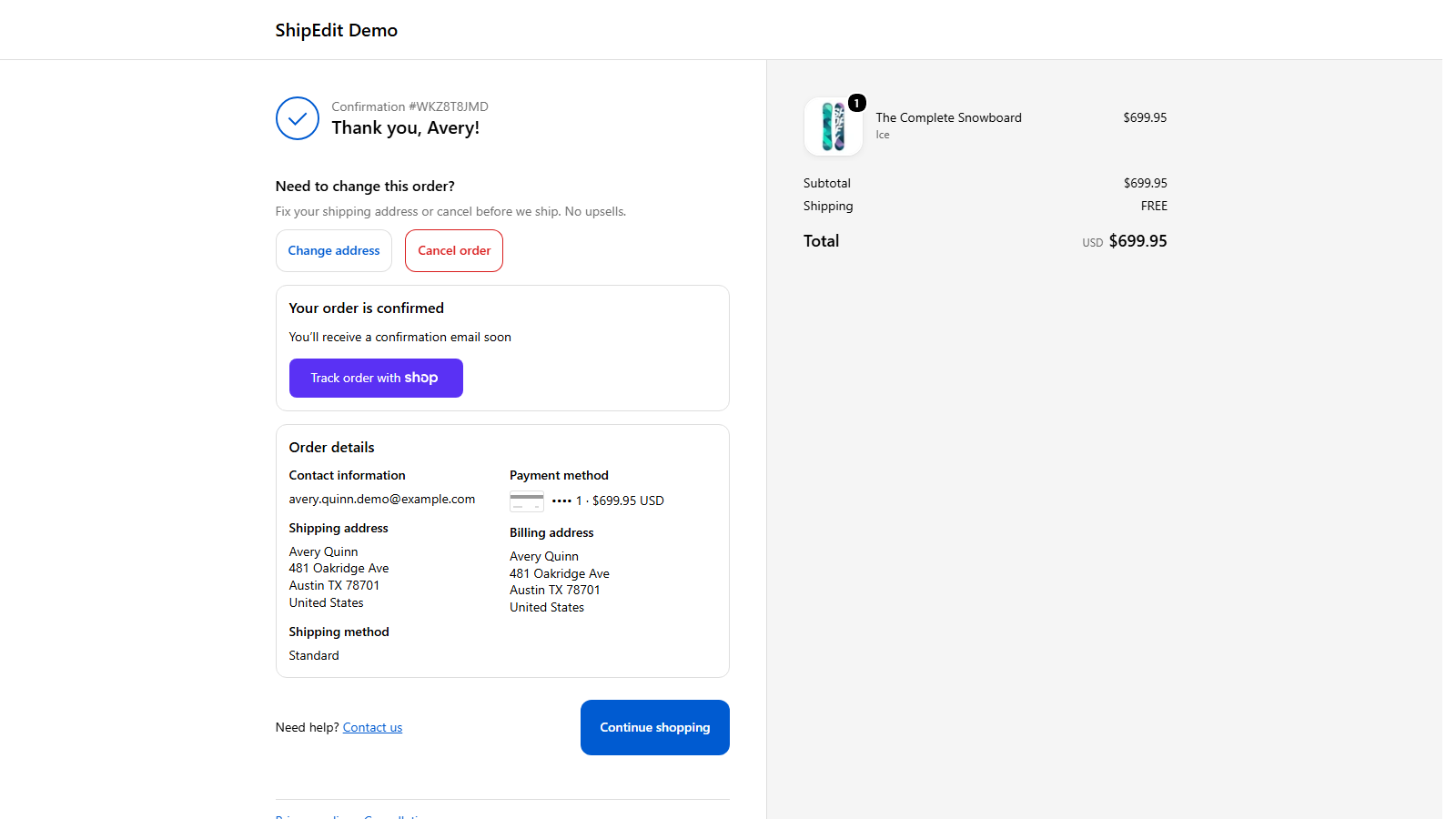
Edit the address or cancel from the order status page
The order status page stays available after the customer leaves checkout. Shopify's order email includes a link to that page. From there the customer can change the shipping address or cancel the order, under the same rules, while the order is still eligible.
What happens once an order is fulfilled
Address changes and cancellations stop as soon as fulfillment starts, including a partly fulfilled order. An order that is only on hold can still be changed, because fulfillment has not started. You can also close the window earlier.
Merchant controls:
- Edit window, in minutes after checkout. Set it to 0 and it stays open until fulfillment starts.
- Toggle address changes and cancellations separately.
- Order tags when the address changes and when the customer cancels. The address-change tag also blocks a second address edit.
- Optional hold fulfillment, which places the order On hold in Shopify.
- Block destinations you do not ship to, including PO Boxes and addresses with no shipping rate.
Setup in a few minutes
- Install ShipEdit from the Shopify App Store.
- In the checkout editor, add the ShipEdit Thank you block and the Order status block.
- Save.
- Place a test order. Customers see Change address on the thank-you page after checkout.
Installing alone does not turn it on. Customers see ShipEdit after you add the Thank you and Order status blocks and save.
Pricing: $9.99/month, no upsells
$9.99 a month for unlimited orders, with a 7-day free trial. No upsells and no product swaps. Trial terms are on the Shopify App Store listing.
Who it's for
Stores that answer address tickets, direct-to-consumer brands, and high-volume small merchants. If you fulfill yourself or with a 3PL, the customer fixes the Shopify order before it ships, and your fulfillment app reads that same order.
FAQ
- Can Shopify customers change their shipping address after placing an order?
- Not by default. They usually email the store and staff edit the order. With ShipEdit, customers can update the shipping address themselves from the thank-you page or order status page before fulfillment, within the rules you set.
- How do I let customers edit their address on the Shopify thank-you page?
- Install ShipEdit, then add the ShipEdit Thank you block in the checkout editor and save. Customers see Change address on the thank-you page after checkout. Installing alone does not turn it on.
- Can customers cancel a Shopify order before it ships?
- Yes, if you enable cancellations in ShipEdit. Customers can cancel from the thank-you or order status page before fulfillment. Cancellations restock inventory, and a refund is issued when applicable.
- What happens if the order is already fulfilled?
- Edits and cancels stop as soon as fulfillment starts, even for a partly fulfilled order, or earlier if you set a shorter edit window.
- Does ShipEdit work on the order status page?
- Yes. Add the Order status block in the checkout editor. Customers who open their order status link can change the address or cancel under the same rules.
- Does it need Checkout Extensibility or a particular Shopify plan?
- Yes on Checkout Extensibility (upgraded checkout / checkout and accounts editor). ShipEdit uses Thank you and Order status UI extension blocks only. Those work on Basic Shopify and up (not Starter). Not Shopify Plus-only: Plus-only is information/shipping/payment checkout steps; ShipEdit does not use those.
- How much does ShipEdit cost, and are there upsells?
- $9.99 a month for unlimited orders, with a 7-day free trial. ShipEdit only does address changes and cancellations. No upsells or product swaps.
- What customer data does ShipEdit access?
- ShipEdit processes order and shipping details needed to apply an address change or cancel on the merchant's behalf. See the Privacy policy (/privacy) for roles, retention, and Shopify compliance webhooks.
- Does it work with my 3PL or fulfillment app?
- Changes write to the Shopify order itself, so anything that reads the order sees the new address.