Shopify shipping damage claims: collect photos and track status on the order
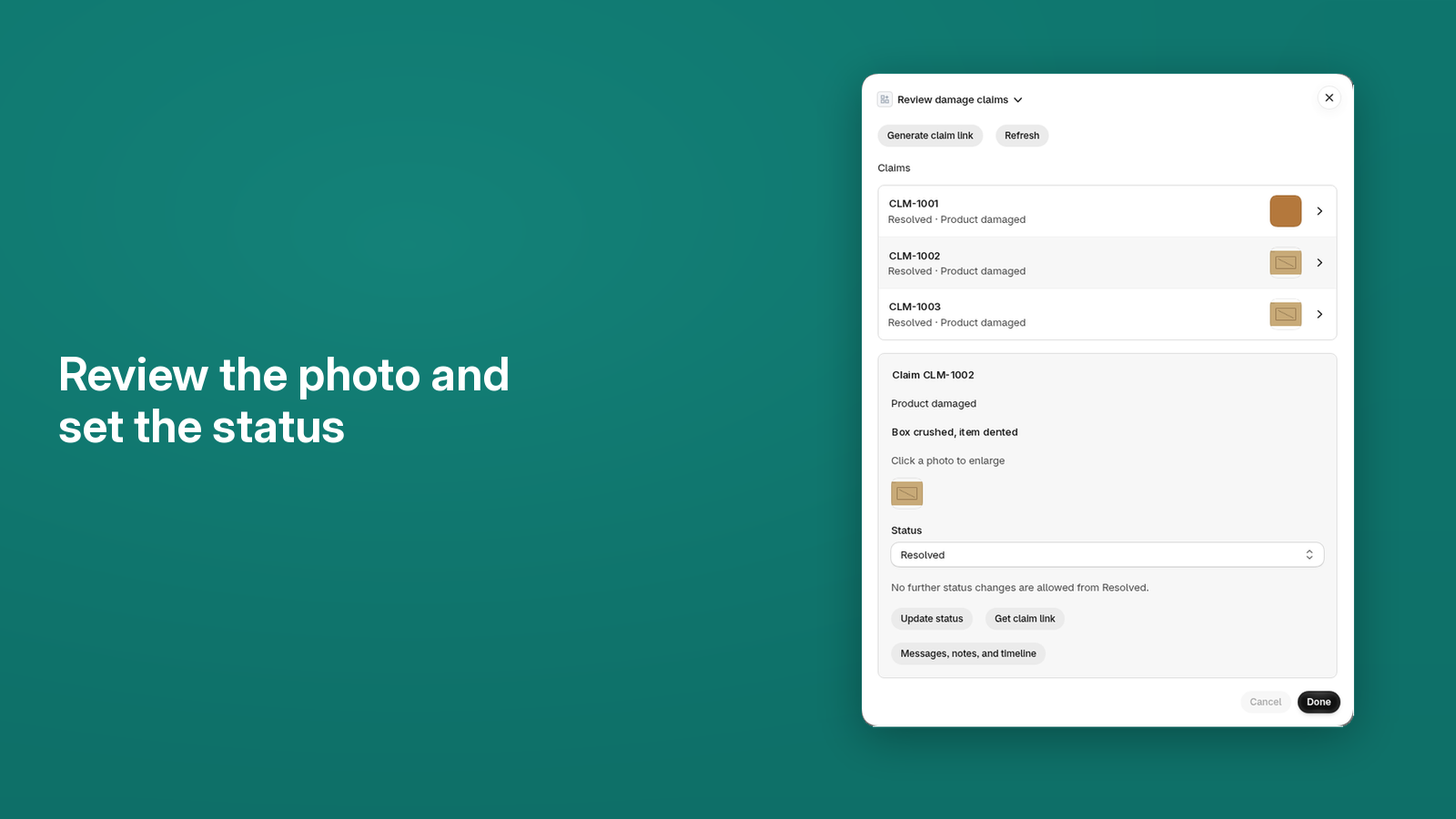
After delivery, collect damage claim photos of a damaged package and keep the claim on the order. Damage claims are Shopify only for now. WooCommerce claims are in progress.
DamageDesk is now part of ShipEdit.
What ShipEdit does not do
ShipEdit collects damage evidence and tracks claim status. It does not issue refunds, reship items, file carrier claims, charge shopper protection fees, or sell shipping insurance. You refund, replace, or file a carrier claim yourself, the same way you do today.
How it works
Claims are allowed only after the order has fulfilled items. Partial fulfillment is fine. Only fulfilled items and quantities can be claimed. An unfulfilled order is blocked, with the message "Claims can be filed once the order is fulfilled."
- On a fulfilled order, open the Damage claims block and send a claim link. Pin that block on the order page. Installing the app does not add it, and Shopify does not pin it for you.
- The customer opens the link. A one-time code goes to the order email. The link has its own access key, so they do not need a Shopify account. They pick the damaged items and quantities, a damage type, a description, and photos (upload or the in-browser camera, including HEIC). Damage types are Product damaged, Packaging damaged, Missing parts, Wrong item, Shipping damage, and Other.
- Your team reviews the photos on the order, sends a customer-visible message, adds an internal note, and sets a status. Internal notes never appear on the claim page. A customer-visible message can unlock the form when the status is Waiting on customer.
An optional File damage claim block on the customer-account order status page lets a logged-in customer start there. That block is optional, Shopify only, and needs customer-account network access.
What you get
- Statuses: New, Under review, Waiting on customer, Approved, Rejected, and Resolved. The timeline records status changes.
- Customer-visible messages, and internal notes that stay off the claim page.
- Order tags: damage-claim, damage-claim-open, and damage-claim-resolved. Open stays on, including approved and rejected claims, until every claim on the order is resolved.
- Download a ZIP of one claim and its original photos. There is no bulk download.
- Email alerts, and an optional outbound webhook.
Photo requirement groups, and the read-only claims REST API and MCP (merchant-created Bearer keys), are Claims Pro only. Existing keys stay readable. Creating and using them requires Claims Pro.
Before you ship, customers can still change a shipping address or cancel the order. Those stop when fulfillment starts. Claims start after fulfilled items exist.
Shopify pricing
Address-and-cancel limits differ by plan. Damage claims are Shopify only. No trials. Prices are monthly. The same plans are on the Shopify App Store listing.
| Plan | Price | Address edits and cancels | Damage claims a month | Claim retention | Photo groups and claims API |
|---|---|---|---|---|---|
| Free | Free | 2 a month | 5 | 90 days | No |
| Damage Claims | $9.99 | 2 a month | 50 | 1 year | No |
| Address Edit | $9.99 | Unlimited | 5 | 90 days | No |
| Address + Claims | $14.99 | Unlimited | 50 | 1 year | No |
| Claims Pro | $24.99 | Unlimited | Unlimited | 3 years | Yes |
When the shop is at its monthly claim cap, staff cannot start a new claim. Existing claims stay available. A warning starts at 80% of the cap. Claims Pro has no monthly claim cap.
FAQ
- Does ShipEdit file the carrier claim or issue a refund?
- No. You get the photos and a status on the order. You refund, replace, or file a carrier claim yourself.
- When can a customer file a damage claim?
- Once the order has fulfilled items. Partial fulfillment is fine; only fulfilled items can be claimed.
- Do damage claims work on WooCommerce?
- Not yet. Shopify only for now.
- What happens if we reach the monthly claim limit?
- Staff cannot start a new claim until the next month or a plan upgrade. Existing claims stay available.
- Does the customer need an account?
- Not for a claim link you send. An optional order status block is available for logged-in customers.
- What does it cost?
- Shopify plans: Free; Damage Claims $9.99; Address Edit $9.99; Address + Claims $14.99; Claims Pro $24.99 a month. No trials. Damage claims are Shopify only.
- What statuses can a claim have?
- New, Under review, Waiting on customer, Approved, Rejected, and Resolved.
- Which order tags does a claim add?
- damage-claim, damage-claim-open, and damage-claim-resolved. Open stays on until every claim on the order is resolved, including claims that are approved or rejected.
- Does installing turn claims on?
- No. Pin the Damage claims block on the order page. Installing the app does not add it.
- Can I download the claim and its photos?
- Yes. Download a ZIP of that claim and its original photos. There is no bulk download.
- Who can use photo requirement groups or the claims API?
- Photo requirement groups and the read-only claims API and MCP are Claims Pro only. Existing keys stay readable. Creating and using them requires Claims Pro.
- Need help?
- Email support@shipeditapp.com.
Collect damage photos on the Shopify order
Get ShipEdit on ShopifyOn WooCommerce, ShipEdit is address changes and cancellations only. Damage claims are not available in the plugin yet. WooCommerce address changes.